DeepSeek review: I tested it for writing, coding, and research. See results, pricing, and the best use cases in 2026
What is DeepSeek?
DeepSeek is basically an AI model (like ChatGPT) that you can also use like a chatbot. In simple terms, it’s an AI system trained on a ton of text + code so it can understand what you type and respond back with something useful.
It’s mainly designed for stuff like:
- writing and editing text (summaries, explanations, brainstorming, etc.)
- coding (generating code, fixing bugs, refactoring, writing tests)
- reasoning (step-by-step problem solving, logic questions, math-ish tasks)
- general Q&A (just asking questions and getting answers)
What is it designed for?
DeepSeek is honestly best when you use it for technical tasks, not just casual chatting.
It does normal chatbot things fine, but it really shines when you’re doing things like:
- software/dev work
- understanding code or generating it
- structured outputs (like JSON or scripts)
- multi-step reasoning where you want it to “think” a bit
Who is DeepSeek made for?
DeepSeek feels like it’s mostly made for:
- developers who want a coding assistant
- people building AI apps/tools
- researchers or technical users who need reasoning + math help
- teams that want something strong but not crazy expensive
So yeah, it’s an AI chatbot, but it’s more like a “developer AI” than a super friendly casual assistant.
How DeepSeek Works
DeepSeek is what people call a large language model (LLM). Which sounds super complicated, but the basic idea is pretty simple.
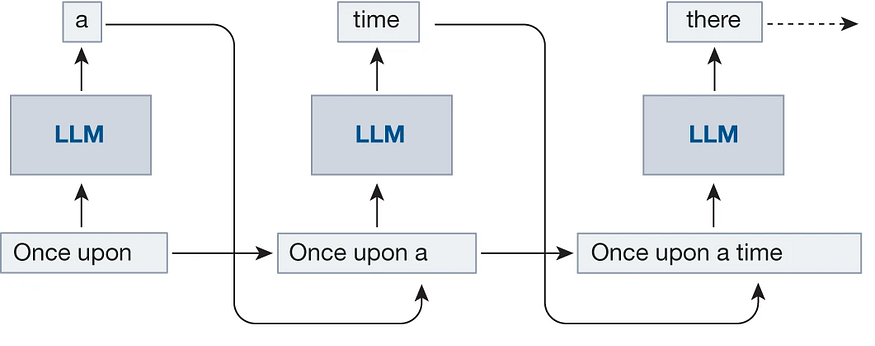
It’s trained on a huge amount of data (like text from the internet, books, code, etc.), and it learns patterns from all of that. Then when you type something in, it
basically tries to predict what text should come next.
So like… if you ask it a question, it doesn’t “look up” the answer the way Google does. It’s more like it generates an answer based on what it has seen during training and what it thinks makes the most sense.
DeepSeek Key Features
Chat Interface
What it does: Lets you talk to DeepSeek like a normal chatbot, you type something and it replies back.
Why it matters: It’s easy to use even if you don’t really know much about AI stuff.
Coding Help
What it does: Helps write code, fix bugs, explain code, and even do refactoring or unit tests sometimes.
Why it matters: This is one of the main reasons people use DeepSeek, it’s really good for dev work.
Reasoning Ability
What it does: Can solve problems step-by-step, like logic questions, math problems, or “how do I do this” type things.
Why it matters: A lot of chatbots can talk a lot, but they don’t always actually think through stuff properly.
Writing & Rewriting
What it does: Can write paragraphs, rewrite text, fix grammar (even tho it’s not perfect), and change tone.
Why it matters: Saves time when you’re writing blogs, docs, emails, or anything like that.
Summarization
What it does: Takes long text and makes it shorter, like a quick summary.
Why it matters: Super useful if you don’t wanna read a huge article or long documentation.
Brainstorming
What it does: Gives you ideas for content, projects, startup ideas, names, feature ideas, etc.
Why it matters: It’s good when you’re stuck and your brain is just not working that day lol.
Multi-Language Support
What it does: It can understand and write in multiple languages, not just English.
Why it matters: Helpful if you’re working with different audiences or just need translation help.
My Testing Method (and Results)
To keep this review fair, I didn’t just try like 2 prompts and call it a day. I tested DeepSeek in a few common real-world ways, basically the same way I’d test any AI model (ChatGPT, Claude, etc.). I tried to keep the prompts normal and realistic too, not some weird benchmark-only stuff.
Here’s what I tested + how it actually did:
Writing test
What I tested: Blog paragraphs, rewriting messy text, changing tone (casual → formal), and fixing grammar.
How I tested: I gave it the same writing prompts I usually give other AI tools.
Result: Pretty good overall. It writes clearly and stays on topic, but sometimes it sounds a little stiff or “AI-ish” if you don’t guide it. Rewriting was solid tho.
Coding test
What I tested: Code generation, bug fixing, refactoring, explaining code, and writing simple tests.
How I tested: I used small tasks first, then a few harder ones.
Result: This is where DeepSeek shines the most. It was honestly really strong at coding, especially debugging and writing clean code. It still makes mistakes sometimes (like wrong imports or missing edge cases), but compared to many models it’s kinda impressive.
Research test
What I tested: “Explain this topic” prompts + comparisons between tools and concepts.
How I tested: I asked it things I already knew, so I could catch if it’s making stuff up.
Result: Mixed. The explanations were usually good and easy to understand, but it can still hallucinate or act confident about things that are not fully correct. So yeah, don’t treat it like Wikipedia.
Summarization test
What I tested: Summarizing long text into short summaries, bullet points, and beginner-friendly explanations.
How I tested: I pasted long paragraphs and asked for different summary styles.
Result: Pretty solid. It summarizes well and doesn’t lose the main points. Sometimes it leaves out small details, but that’s kinda normal for AI summarizers anyway.
Idea generation test
What I tested: Blog ideas, content outlines, startup ideas, feature ideas, and naming ideas.
How I tested: I gave it broad prompts and also very specific ones.
Result: Good but not mind-blowing. It gives lots of ideas fast, but some of them are generic. If you keep pushing it (“give more unique ideas”), it gets better.
Why this test is fair
I used the same type of prompts that normal people actually use, not just cherry-picked ones. And I tested it across multiple areas (writing, coding, research, summarization, brainstorming) so it’s not only judged on one strength.
Also I didn’t go easy on it, but I also didn’t try to trick it with impossible prompts either
DeepSeek Pros and Cons
Pros
- Really strong at coding (code generation, debugging, explaining, refactoring is actually good)
- Good reasoning for the price (it can solve step-by-step problems better than I expected)
- Fast responses most of the time, it doesn’t feel super slow or heavy
- Works great for technical writing like docs, tutorials, and dev explanations
- Summarization is solid and it keeps the main points without getting too messy
- Good for structured outputs (like lists, JSON, steps, etc.) if you prompt it right
- Feels more “developer focused” than a lot of random chatbots out there
Cons
- Not the best “friendly assistant vibe” compared to models that are trained for conversation more
- Still hallucinates sometimes and can sound confident even when it’s wrong
- Writing can feel kinda stiff if you want a super natural human tone
- Not always perfect at following constraints (like word count or formatting rules)
- Can miss edge cases in code unless you specifically ask it to check them
- Research answers need fact checking because it may mix real + made up info
- Some responses feel generic especially for brainstorming unless you push it more
DeepSeek Pricing
Is it free?
Yes — the main DeepSeek chat experience is free to use. You can go to the official DeepSeek site or app and talk to the assistant without paying anything, and the core features (chat, summaries, basic coding help, etc.) are available at no cost right now.
Does it have paid plans?
Yes — there are paid options, but they’re mainly for developers and businesses rather than everyday users. DeepSeek doesn’t push a “Plus” or “Pro” subscription for normal chat users, but it does charge usage-based fees for API access if you want to build apps or integrate models into software.
What users get on free vs paid
Free version
- Access to DeepSeek’s chat interface and models online or in the app
- General Q&A, summaries, basic writing help, beginner coding help
- No subscription or upfront cost to start
- Some rate limits or fair-use limits might apply during busy times
Paid/API version
- Pay-as-you-go API access for developers
- Billed based on the number of tokens you send & receive
- Typically cheaper per token than many competitors (e.g., ~$0.07–$0.14 per million tokens on some models)
- Useful for building your own apps, bots, or high-volume usage
Who should pay?
- Developers & startups building products that need AI inside them
- Businesses using DeepSeek at scale or integrating it with backend systems
- High-volume users where free chat isn’t enough and predictable billing matters
- Teams needing API access or custom integrations
Everyday writers, students, or casual chatbot users can usually stick with the free version, but if you want to build stuff or use it in production, then the paid/API side is what you’d need.
Who should use Deepseek?
DeepSeek is honestly pretty flexible, but it’s best for certain types of people more than others.
People who want long explanations – it can go deep and give step-by-step breakdowns when you ask for it (and it’s actually pretty good at it too)
Students – good for explaining topics, summarizing notes, and helping with studying (just don’t trust it 100% without checking)
Bloggers – helpful for outlines, rewriting, intro paragraphs, and idea generation when you’re stuck
Developers – probably the best use case overall, it’s really strong for coding help, debugging, and writing scripts
Startup founders – useful for brainstorming ideas, writing product copy, planning features, and even quick pitch drafts
Researchers – decent for summarizing papers or explaining concepts, but you still gotta fact-check because it can hallucinate
People who want quick answers – it’s fast and gets to the point pretty well for simple questions
Who Should NOT Use DeepSeek?
This part is important, because DeepSeek is good… but it’s not for everyone. And if you use it for the wrong thing, you’ll probably end up annoyed (or worse, misinformed).
Here’s who should not rely on DeepSeek:
- People who need 100% accurate medical or legal info
It can explain concepts, but it can also get details wrong or sound confident while being incorrect. For serious health/legal stuff, you need real professionals or verified sources. - People who need citation-heavy research
DeepSeek can summarize and explain topics, but it’s not a perfect research tool. It might not give reliable citations, and sometimes it will “invent” sources if you push it. - People who want super human writing with zero edits
It can write well, but sometimes the tone still feels a little AI-ish. If you want writing that sounds 100% natural, you’ll probably need to rewrite parts. - People who need real-time news or live updates
DeepSeek isn’t a live news engine. It doesn’t automatically know what happened today unless it’s connected to up-to-date sources. - People who can’t fact-check anything
If you’re going to copy/paste answers without checking, it’s honestly risky. DeepSeek is best when you treat it like a smart assistant, not a perfect truth machine.
Basically: DeepSeek is great for productivity, coding, and learning — but it’s not something you should trust blindly for high-stakes information
Tips to Get Better Results from DeepSeek
If you wanna get really good outputs from DeepSeek, you gotta treat it like a tool, not like magic. Small changes in how you prompt it makes a big difference.
Here are some practical tips that actually help:
Push it one more time
If the answer is too generic, just say “make it more detailed” or “give more unique ideas.” It usually improves on the 2nd try.
Be specific with what you want
Don’t just say “write about DeepSeek.” Say “write a 150 word intro for a tech blog in a casual tone.”
Give an example of the style you like
If you paste a small sample (even 2–3 sentences), DeepSeek usually copies the vibe pretty well.
Ask for a certain format
Like bullet points, numbered steps, a table, JSON, headings, etc. If you don’t ask, it will just pick its own format.
Tell it who the audience is
Example: “Explain this for beginners” or “Explain like I’m a software engineer.” This changes the output a lot.
Ask it to rewrite instead of writing from scratch
DeepSeek is honestly really good at rewriting messy text into something cleaner, so use that.
Ask for step-by-step explanations
If you’re learning something, say “explain step-by-step” or it might skip stuff and jump too fast.
Ask for multiple options
Like “give me 5 headlines” or “give 3 versions of this paragraph.” It helps you pick the best one.
Make it check its own work
You can say stuff like “double check for mistakes” or “list possible edge cases.” This helps a lot for code.
Final Verdict: Is DeepSeek Worth It?
DeepSeek is definitely worth trying if you want a developer-friendly AI assistant that’s strong at coding, reasoning, writing help, and summarization without a big cost.
It’s best for students, developers, founders, bloggers, and anyone who wants clear answers or deep explanations — just don’t rely on it for high-stakes factual data or real-time info.
Verdict: DeepSeek is a solid, practical AI tool that punches above its weight, especially for technical tasks — just use it with common sense and a bit of fact-checking.
FAQ
Is DeepSeek free?
Yeah, DeepSeek is free to use for normal chat stuff. If you’re using the API for building apps, then that’s usually paid.
Is DeepSeek safe?
Mostly yes, like it’s not some sketchy tool, but you still shouldn’t paste super private info into any AI chatbot. Just common sense tbh.
What is DeepSeek best used for?
DeepSeek is best for coding help, reasoning, summarizing, and writing support. It’s kinda built more for technical use than “fun chat” use.
Can DeepSeek write code?
Yes, and honestly it’s one of the best parts of it. It can write code, debug, explain code, and even generate tests (but you still need to check it).
Does DeepSeek give accurate information?
Sometimes yes, sometimes no. It can explain topics well, but it can also hallucinate and sound confident while being wrong. So don’t treat it like a 100% trusted source.
Is DeepSeek good for students?
Yeah, it’s actually really helpful for students. It can explain concepts, summarize notes, and help with studying. Just make sure you double-check facts, especially for serious topics.
Can DeepSeek replace Google?
Not really. It’s good for explanations and quick answers, but for real-time news, sources, or super accurate facts, Google (or real sources) still wins.
Is DeepSeek better than ChatGPT?
Depends what you’re doing. For coding and technical tasks, DeepSeek can be really competitive. For super polished writing and conversation, ChatGPT might still feel better.