
Learn how ChatGPT works with a simple, beginner-friendly explanation. Discover what ChatGPT is, how it understands text, and its key features.
What Is ChatGPT?
ChatGPT is an AI chatbot that can understand what people type and reply back in a pretty natural way. It’s made to answer questions, explain things, and basically talk with you through text, like a normal conversation.
It was developed by OpenAI, a company that works on artificial intelligence tools. ChatGPT uses artificial intelligence and something called natural language processing to read your message, figure out what you’re trying to say, and then respond. It doesn’t always get it right, but most of the time it does a decent job.
So what can ChatGPT do? Here’s a few things:
- Answer questions on many topics
- Help write stuff like emails, blogs, or essays
- Assist with coding or fixing errors
- Summarize long text or explain confusing ideas
- Just chat with you when you’re bored
It’s not a human and it doesn’t think on its own, but for a lot of people, it’s still really useful for everyday things.
So How ChatGPT works?
At a basic level, ChatGPT works by learning from a huge amount of text. During training, it was shown books, articles, websites, and conversations so it could learn how words usually go together. It’s not reading the internet live or remembering specific pages, it’s more like learning patterns from examples
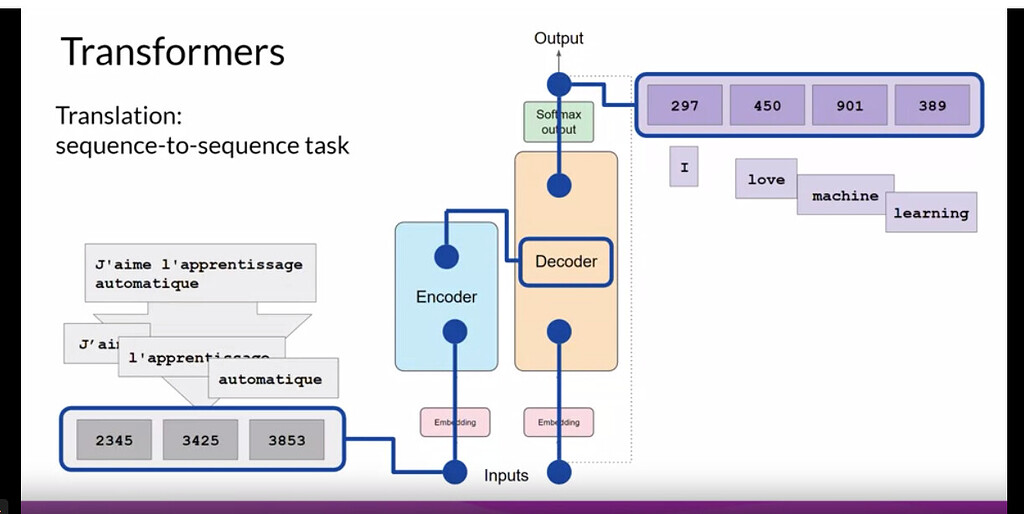
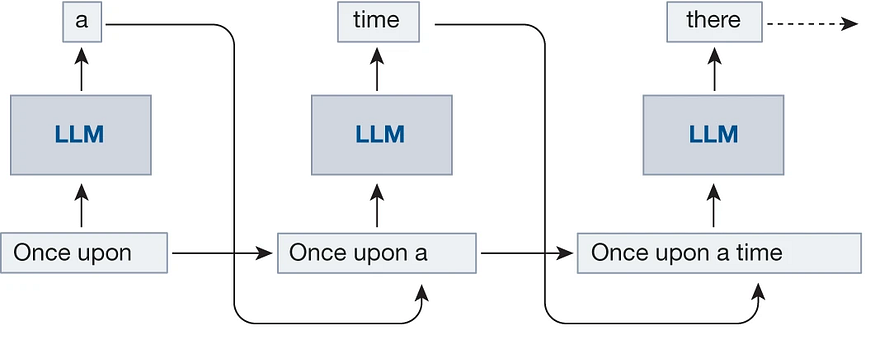
When you type something, ChatGPT doesn’t stop and think the way a human does. Instead, it looks at your words and starts predicting what word should come next. Then the next one. And the next one. This happens very fast, which is why the reply feels instant
It’s important to know that ChatGPT doesn’t actually understand meaning the way people do. It doesn’t have opinions, beliefs, or awareness. It just knows that, based on patterns it learned, some words are more likely to follow others.
So every response you see is built on probabilities. ChatGPT is basically asking, “What’s the most likely next word here?” again and again until a full answer is formed. That’s the simple idea behind how ChatGPT works, even if the tech behind it is pretty complex.
How ChatGPT Is Trained
ChatGPT is trained using a mix of different text sources. It learns by looking at patterns in language, not by memorizing exact sentences or storing personal data.
- Trained on lots of text
ChatGPT was trained on a large amount of books, articles, websites, and other online text. This helps it learn how people usually write and talk, like what words often appear together. - Uses machine learning
Instead of being programmed with fixed answers, ChatGPT uses machine learning. That means it learns from examples and slowly gets better at predicting what a good response should look like. - Human reviewers help shape it
After training, human reviewers check some of its responses and give feedback. This helps guide the model toward being more helpful and safer, though it still messes up sometimes. - Learns patterns, not facts or opinions
ChatGPT doesn’t truly know facts or have opinions of its own. It learns patterns in text and uses probabilities to generate replies, which is why it can sound confident even when it’s wrong.
So basically, it learns how language works, not what to believe.
Does ChatGPT learn from you?
This is one of the most common questions people have, and the short answer is: no, ChatGPT doesn’t learn from you in real time.
ChatGPT does not remember your personal conversations. When you close a chat, it doesn’t store your messages or recall them later like a human would. Each conversation is context-limited, meaning it can only see and respond to what’s written inside the current chat. Once that session ends, the context is gone.
Training also doesn’t happen live while you’re talking to it. ChatGPT isn’t quietly updating itself based on what you type. Any improvements to the model happen separately, during training updates done by the team at OpenAI, not during individual conversations.
So even though it may feel like it’s “learning” you, it’s really just following patterns and responding to what’s in front of it at that moment—and nothing more.
But doesnt ChatGPT have memory?
ChatGPT can have memory, but it’s not the same thing as remembering your chats like a human.
1. Memory inside a single chat
During one conversation, ChatGPT can remember what you said earlier in that same chat. That’s why you don’t have to repeat yourself every message.
But once the chat ends or you start a new one, that memory is gone.
So it’s more like short-term memory, not long-term.
2. Optional long-term memory (only if enabled)
Some versions of ChatGPT have a memory feature that can save general preferences you share, like:
- How you like answers formatted
- Your writing style preference
- Ongoing projects (if you ask it to remember)
This memory is:
- Not automatic
- Not personal chat logs
- Not every message you type
And you can view, edit, or turn it off anytime.
3. What it does NOT remember
ChatGPT does not:
- Remember past private conversations word-for-word
- Track you across random chats
- Learn from you live during a conversation
Training still happens separately, not in real time.
How ChatGPT Understands Questions
When you ask something, ChatGPT doesn’t just look at one word at a time. It pays attention to context within the conversation, meaning it uses what you said earlier in the same chat to understand what you’re really asking. That’s why follow-up questions usually work without you repeating everything again.
It also relies heavily on language patterns. During training, ChatGPT learned how words, phrases, and sentences are commonly used together. So when you type a question, it matches your wording with patterns it has seen before and figures out what kind of answer usually fits.
This is also why clear prompts get better answers. If a question is vague or messy, ChatGPT might guess wrong or give a generic reply. But when you’re specific—like giving details or saying exactly what you want—the response is usually more accurate. It’s not mind-reading, it’s just working with the clues you give it
Why ChatGPT Sometimes Makes Mistakes
Even though ChatGPT can sound very confident, it doesn’t actually have real understanding. It’s not aware of facts in the way humans are, and it doesn’t know when something is true or false. It just generates text that sounds right based on patterns it learned.
Because of that, it can sometimes give answers that are wrong but still sound convincing. This can be misleading if you don’t double-check important information. It’s not trying to lie, it just doesn’t know it’s wrong.
ChatGPT also depends a lot on the quality of your input. If a question is unclear, missing details, or badly worded, the answer might also be off. Vague prompts usually lead to vague or incorrect responses.
How to Use ChatGPT Effectively
To get good results from ChatGPT, how you ask matters a lot. The clearer and more specific your question is, the better the answer usually turns out. If you just ask something vague, ChatGPT has to guess what you want, and that’s when things can go a bit off.
Providing context also helps. For example, instead of asking “Explain this,” it’s better to say what this is and why you need the explanation. A little background can make a big difference in the quality of the response.
If you’re working on something complicated, try to break it into smaller steps. Asking ChatGPT to do everything at once can lead to messy or shallow answers. Step-by-step questions are easier for it to handle and usually more accurate.
And finally, always verify important information. ChatGPT is a great helper, but it’s not perfect. For things like health, money, or legal topics, double-check with reliable sources before acting on the advice
Is ChatGPT Safe to Use?
For most everyday uses, ChatGPT is generally safe. People use it to learn, write, brainstorm ideas, or just ask random questions, and that kind of stuff is fine. It’s designed to be helpful, not harmful, but it’s still a tool and not something you should blindly trust with everything.
You should avoid sharing sensitive information. That means things like passwords, bank details, personal documents, or anything you wouldn’t post publicly online. Even though chats feel private, it’s better to stay cautious.
Using ChatGPT responsibly is important too. Don’t rely on it for serious decisions without checking facts, and don’t use it to spread false information. It’s best used as support, not as the final say.
Some simple best practices:
- Don’t share personal or confidential data
- Double-check important answers
- Use it as a guide, not a replacement for experts
- Be clear about what you’re asking
If you use it with common sense, ChatGPT can be a very useful and safe tool for everyday tasks.
ChatGPT vs Human Thinking
AI chatbots like ChatGPT and humans work in very different ways, even if the replies sometimes sound similar. ChatGPT’s main job is to predict text. It looks at what you typed and figures out what words are most likely to come next based on patterns it learned during training.
Humans, on the other hand, actually reason and understand. People think, feel emotions, form opinions, and use real-world experiences to make decisions. ChatGPT doesn’t have any of that. It doesn’t understand meaning, and it doesn’t know why something is true—it just knows what usually sounds right.
Because of this, ChatGPT is best used as an assistant, not a replacement for human thinking. It can help you get started, explain ideas, or save time, but the final judgment and decisions should always come from a human.
Conclusion – How ChatGPT Works in Simple Terms
So in simple words, ChatGPT works by learning patterns from a massive amount of text and then predicting what to say next. It doesn’t think, feel, or understand like a human does, but it’s really good at sounding helpful and making information easier to access.
If you’re a beginner, there’s nothing to be worried about. You don’t need to understand the technical side to use ChatGPT properly. Just ask clear questions, give some context, and treat it like a smart helper—not a human brain.
AI assistants like ChatGPT are only going to become more common in the future. They’ll get better at helping with everyday tasks, learning, and creativity. But at the end of the day, they’re tools meant to support people, not replace them. Use them wisely, and they can actually make life a bit easier.
💡Also read: Best AI chatbots to try in 2026