
In this post I will tell you how to delete instagram account, difference between deleltion and deactivation and everything else you need to know

Difference between deletion and deactivation
Before we talk about how to delete your account, its good to first know what deletion is and how it is different from deactivation so that you don’t make any mistake.
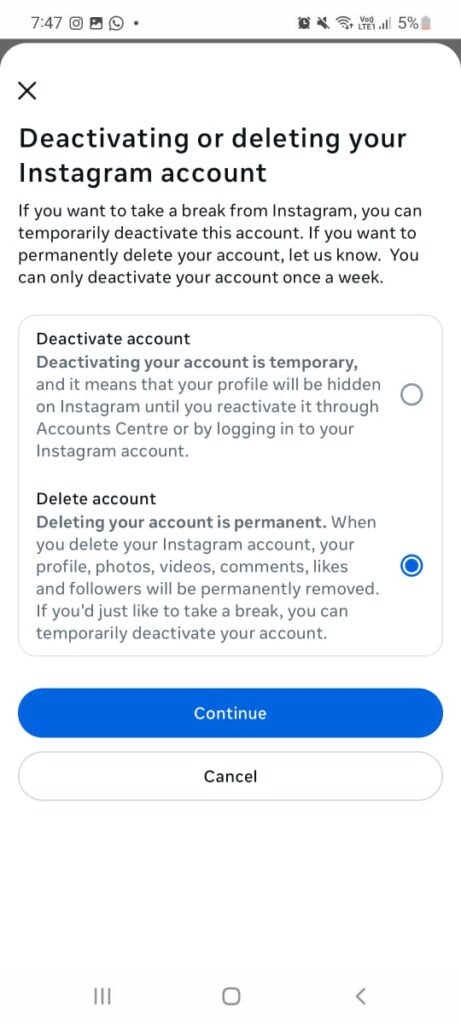
Deleting your account means your account, your profile, posts ,highlights, comments, and followers are permanently removed and cannot be retrieved later on. This is crucial to know because many people often delete their account before saving their photos and videos which results in regret because you cannot get them back after you delete your account.
On the other hand, Deactivating your Instagram account means temporarily hiding your profile and content from others, and you can reactivate the account at any time by logging back in
How to delete instagram account
To delete your instagram account permanently, follow these steps
1.Open Instagram
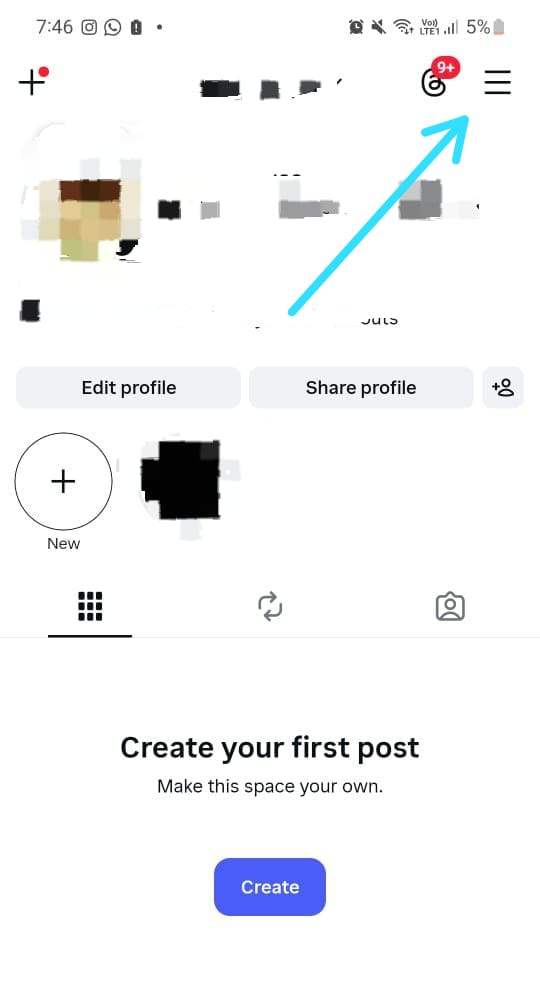
2.On your profile page, click on the three slash symbol at the right top
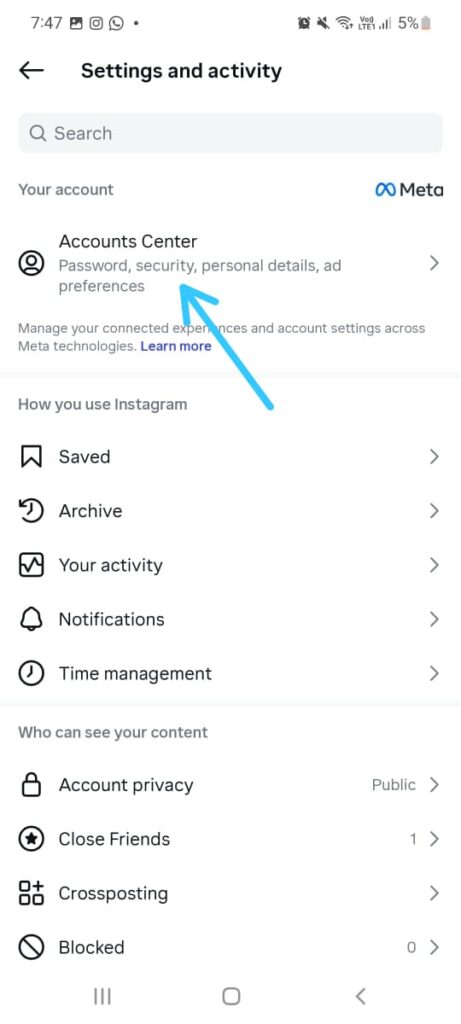
3.Click Account center
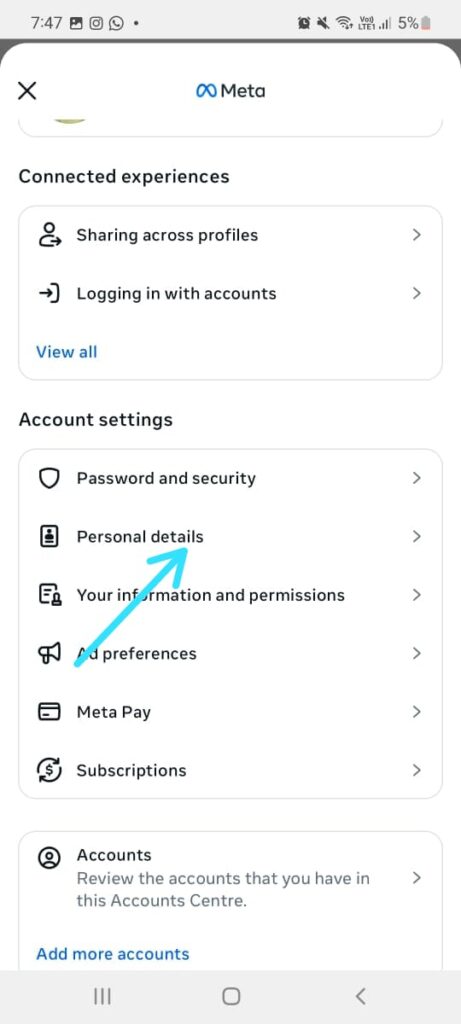
4.Click Personal details
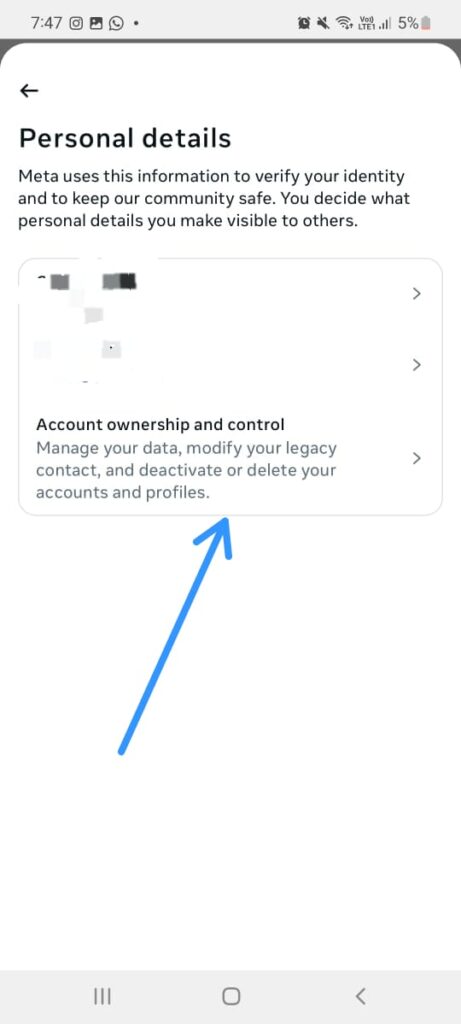
5.Click Account ownership and control
6.Click Deactivation or deletion
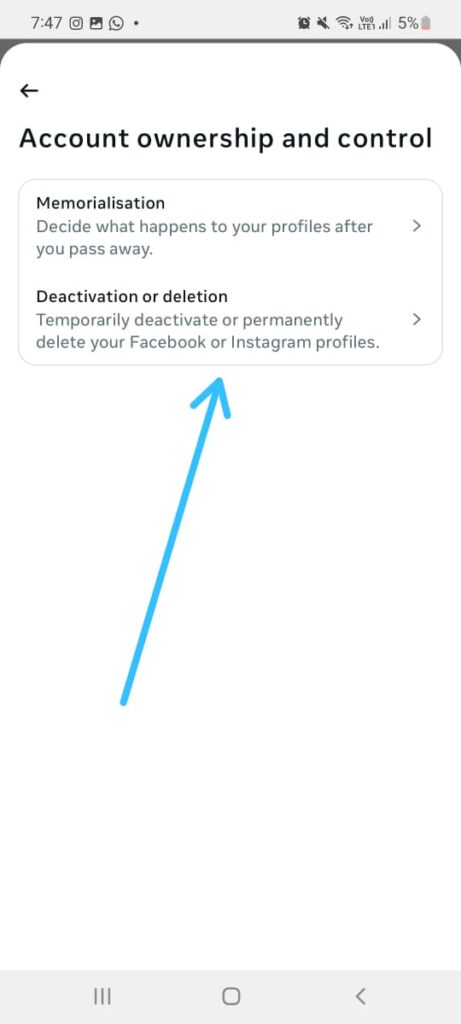
7.Click the account you want to delete or deactivate
8.Click on delete account or deactivate account if you only want a break
Before you delete
Before deleting your Instagram account permanently, take a few important steps to avoid losing data you may need later. First, download your Instagram data, including photos, videos, messages, and profile information, as this content cannot be recovered once deletion is complete.
Second, remember that deleting your account will permanently remove your followers, comments, and likes, and your username may not be available again
What Happens After Deletion
After you delete your Instagram account, it is scheduled for permanent removal, but it is not deleted immediately which means you can still log back in. Instagram gives a grace period of 30 days during which your account remains hidden but can still be restored if you log back in.
If you do not log in during this time, your profile, photos, videos, comments, likes, and followers are permanently removed.Instagram may take up to 90 days to fully delete all copies of your data from its systems, and once the process is complete, the account cannot be recovered.
Commonly asked questions-
1.How long does it take for Instagram to delete an account permanently?
Instagram usually gives a 30-day grace period after you request deletion. If you don’t log in during this time, your account is permanently deleted. It may take up to 90 days for Instagram to completely remove all data
2.Can I recover my Instagram account after deleting it?
You can recover your account only during the grace period by logging back in and canceling the deletion request. Once the account is permanently deleted, it cannot be recovered
3.Can I delete my Instagram account from the app?
Yes, you can delete your Instagram account from both app and browser
4.Does deleting Instagram also delete my Facebook account?
No. Deleting your Instagram account does not delete your Facebook account, even if they are linked through Meta. However, the connection between the two accounts will be removed
Conclusion
Deleting your Instagram account is a big step, so it’s worth taking a moment to be sure it’s the right choice for you. Once the process is finished, your photos, messages, and profile are gone for good and can’t be brought back. If you’re confident you’re ready to move on, following the steps above will help you delete your account without issues. But if there’s even a small chance you might want to return later, temporarily deactivating your account could be the safer option.
💡 Also read: How to Reactivate Instagram Account